
 (925) 293-3313
Amazon says that starting August 31, 2026, if one of your Fulfilled by Merchant (FBM) offers puts your Account Health at risk, it will temporarily deactivate that offer. With FBM, you handle the storage, packing and shipping of the order. We read this in Seller Central’s United States marketplace.
Account Health is the Seller Central page where Amazon shows your performance rates. Amazon’s pages use both “offer” and “listing”, and the sources reviewed here do not say how the two relate.
Amazon’s other pages also disagree about the penalty for FBM offer deactivation. The Shipping Performance detail view says an On-Time Delivery Rate (defined in the next section) below 90% “may result in account deactivation”. A February 2026 Seller Forums post says Amazon may deactivate all your seller-fulfilled listings if that rate is significantly below 90%.
The On-Time Delivery Rate help page recommends over 97% and says there is no penalty for missing the target at this time. So one Amazon page says one offer, another says some listings and may, in the conditions it describes, deactivate all your seller-fulfilled listings, and a third says “account deactivation”; the table below sets them side by side.
How this was checked. On October 1, 2026, in Seller Central: the announcement, the Account Health dashboard, the Orders with Defects report, the Shipping Performance detail view, an order page, Notification Preferences and the four help pages the announcement links to; and on Seller Forums, the February post. The photograph at the top is generated with ChatGPT from our prompt. The screenshots are real captures, and the orange outlines on them are ours.
What the four rates measure
The Account Health dashboard in Seller Central shows these four rates, each with a target:
- Cancellation Rate, which the dashboard shows as Pre-fulfillment Cancel Rate: the share of orders you cancel. Its help page uses a 7-day period. Target under 2.5%.
- Late Shipment Rate: the share of orders you ship late. Its help page uses 10-day and 30-day periods. Target under 4%.
- Order Defect Rate: the share of orders with negative feedback (one- and two-star seller reviews), an A-to-z Guarantee claim (a buyer’s claim to Amazon for a refund) or a credit card chargeback. Its help page uses a 60-day period. Target under 1%.
- On-Time Delivery Rate: the share of tracked shipments delivered by their estimated delivery date. The detail view notes that Amazon has updated this definition and shows a 14-day window. Dashboard target over 90%.
Where Amazon’s pages disagree about the penalty
Amazon’s pages use five different wordings for the penalty, from one offer to “account deactivation”, and one says there is no penalty at this time:
| Where | What it says |
|---|---|
| August 31 announcement | One offer. Amazon will “temporarily deactivate that offer”. Your other active listings and your overall Account Health are not impacted. |
| February 2026 Seller Forums post, updated February 13, 2026 (On-Time Delivery Rate) | Some listings, or all your seller-fulfilled listings. From February 28, only “the listings that have the most impact on your ratings drop” would be deactivated. If the rate is significantly below 90%, or you repeatedly miss it, Amazon may deactivate all your seller-fulfilled listings. |
| Cancellation Rate, Late Shipment Rate and Order Defect Rate help pages | Offers “with high rates”, or your FBM selling privileges. Going over the limit may lead to suspension of your FBM selling privileges or to deactivation of your seller-fulfilled offers “with high rates” of that problem. The Cancellation Rate page adds that Amazon may remove an offer after a history of multiple order cancellations in a compressed time period. |
| Shipping Performance detail view (On-Time Delivery Rate) | Unclear; the page says “account deactivation”. An On-Time Delivery Rate below 90% “may result in account deactivation”, and the page does not say what “account” means there. |
| On-Time Delivery Rate help page | No penalty for missing the target at this time, according to this help page. It recommends over 97%. |
You reach the detail view with “View details” on the Shipping Performance panel. The August 31 announcement gives no On-Time Delivery Rate threshold and says nothing about the February exception.
The dashboard banner the announcement leaves out
When we checked, one account’s Account Health page showed a banner reading “Your seller-fulfilled offers are at risk of deactivation”. Below it was a line naming On-Time Delivery Rate. The announcement does not mention the banner, so treat it as a signal separate from the warning email.
What Amazon announced about FBM offer deactivation
Amazon posted “Review Account Health updates for FBM offers” in Seller News inside Seller Central on August 31, 2026. It names four policies it evaluates: Cancellation Rate, Late Shipment Rate, Order Defect Rate and On-Time Delivery Rate. Amazon calls the deactivation temporary. The post names no marketplace.
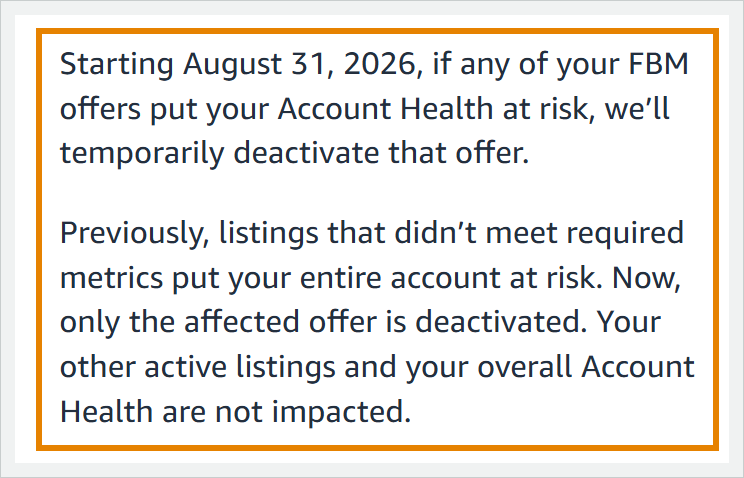
Amazon describes three steps:
- It emails you a warning first. The email carries details on the issue and the steps to resolve it.
- It temporarily deactivates that one offer.
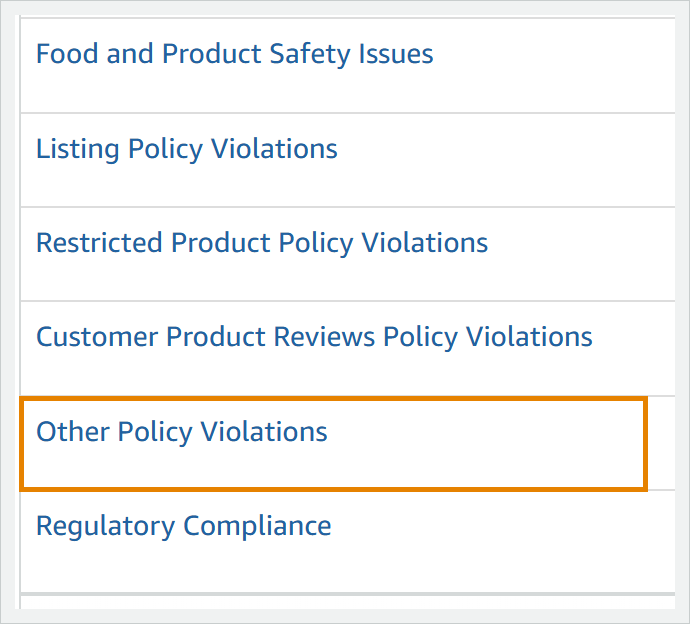
- You find the offer on your Account Health dashboard, select Other Policy Violations and follow the instructions to reactivate it.
To get there, open the three-line menu in Seller Central, then choose Performance, then Account Health. The Other Policy Violations row sits in the All Issues list shown below. We have not seen a deactivated offer there; this is where Amazon says it will appear.
The Orders with Defects report does not name the offer
The report does not name the product. It lists the orders for one week at a time.
Each Order ID links to the order page, which shows the SKU and the ASIN. The ASIN identifies the product, and the SKU is what you use to match the order to one of your offers. If the same SKU turns up on every late order, that offer is the first place to look.
The report is under Reports in Account Health and opens on a bar chart of defects by month, with buttons to step between weeks.
It covers orders that were canceled, shipped late, or received negative feedback, an A-to-z Guarantee claim or a chargeback claim over the past 12 months. Amazon says your Pre-fulfillment Cancel Rate, Late Shipment Rate and Order Defect Rate “are calculated based on these orders”.
The rates use periods of 7 to 60 days, shorter than the report’s 12 months, so the weeks are only a rough guide to Amazon’s calculation windows. We have followed this route only on one account, so treat what it shows as where your risk may sit.
Four checks to run this week
- Make sure Amazon’s emails reach a person, because the announcement promises a warning email first. Open the gear menu, then Notification Preferences. Every email address and phone number listed there needs to be monitored by a person.
- Open Account Health and read the seller-fulfilled figure for each of your four rates against its target. Check the top of the page for the at-risk banner. You reach On-Time Delivery Rate with “View details” on the Shipping Performance panel, and its help page says the rate typically reflects shipping data as of two weeks before you view it.
- If your Pre-fulfillment Cancel Rate, Late Shipment Rate or Order Defect Rate is close to its target or over it, trace it to the orders behind it, as described above.
- Open the Other Policy Violations row. Anything listed there is the first thing to read.
What Amazon has not said
The sources reviewed here leave several questions open:
- how Amazon decides which offer is at risk, including whether it calculates offer-level rates and how many orders an offer needs before it is judged;
- which of the penalty wordings in the table applies to an offer today, including whether the February On-Time Delivery Rate exception still applies;
- how long you have between the warning email and the deactivation, and how long a deactivation lasts;
- whether the Other Policy Violations entry for a deactivated offer counts toward the Account Health Rating;
- how Amazon treats the FBA offer on the same listing when an FBM backup offer, kept for times when your Fulfillment by Amazon (FBA) inventory is unavailable, is deactivated;
- whether the announcement applies outside the United States.
None of the four help pages gives a per-offer formula or a minimum order count.
How we would read it
This is our reading, a judgement and not something Amazon has said. Amazon’s promise is about one offer, but one of its pages still says “account deactivation” and does not define what “account” means there.
Until Amazon says which applies, we would plan around the wording with the harsher consequence: keep On-Time Delivery Rate above 90% and make sure the warning email reaches someone who reads it. The four checks above cover the rest.
Frequently asked questions
Does Amazon deactivate my whole account for FBM problems?
Amazon says only the affected offer is deactivated. Its pages also mention suspension of FBM selling privileges, deactivation of all seller-fulfilled listings and “account deactivation”, and the sources reviewed here do not settle which applies.
Does one deactivated offer affect my Account Health?
Amazon says your overall Account Health is not impacted. The sources reviewed here do not say whether the Other Policy Violations entry counts toward the Account Health Rating, so treat that as unknown.
Will the warning email tell me which offer is affected?
The announcement promises details on the issue, but we have not seen one of these emails yet, so we cannot say whether it names the offer. Check the dashboard as well, and keep every address in Notification Preferences monitored by a person.
Sources
- Amazon’s copy of the announcement in Seller Forums
- Update to OTDR listing deactivation process as of February 28, 2026 (Seller Forums)
- Cancellation Rate help page
- Late Shipment Rate help page
- Order Defect Rate help page
- On-Time Delivery Rate help page
- Amazon seller policies to know (sell.amazon.com, the source of the plain FBM definition)
- A-to-z Guarantee (Amazon customer help, the source of the plain claim definition)
The four help pages were checked inside Seller Central; the Seller Forums copy, the sell.amazon.com page and the amazon.com help page opened without a login.
Written by Josh Hackett for EHP Consulting Group, which manages Seller Central accounts for brands. For an outside read of your account health numbers, book an Amazon account audit.